Autoscaling with ODIN Fleet, AWS GameLift and Unreal Engine
The goal of this guide is to explain how to manage the amount of deployed ODIN Fleet compute instances dynamically,
exemplary by using AWS FlexMatch and GameLift in combination with the ODIN Fleet API.
The automated scaling is based on the amount of players that want to play the game.
By doing this, you can utilize ODIN Fleet for on-demand dedicated game server scaling,
while continuing to rely on GameLift for matchmaking and session orchestration.
Requirements
- A dedicated Unreal Engine game server integrated with AWS GameLift Anywhere
- An Unreal Engine game client
- A backend service (e.g., Firebase Cloud Functions, Node.js, etc.)
- Access to ODIN Fleet and a configured Project, Server Config and autoscaled Deployment
If you need assistance with the basic setup, refer to the ODIN Fleet and AWS GameLift Anywhere integration guide and the ODIN Fleet and AWS GameLift FlexMatch integration guide.
Overview of the steps in this guide
- Configure the ODIN Fleet REST API in the backend
- Configure ODIN Fleet autoscaling
- Add backend integration endpoints
- Update your Unreal Engine game server code to handle session states
To deploy and manage ODIN Fleet servers dynamically, we use the ODIN Fleet REST API. You can generate an SDK in your preferred programming language using the OpenAPI specification. In this example, we use a TypeScript SDK generated from the OpenAPI spec to integrate it into our backend service.
First, specify your configuration parameters and authenticate by passing your access token in the header.
const FleetApi = require("odin-fleet-api");
const OdinAccessToken = "<your-access-token>";
let defaultConfig = FleetApi.DefaultConfig;
var headers = {
Authorization: `Bearer ${OdinAccessToken}`,
};
var config = {
basePath: defaultConfig.basePath,
headers: { ...defaultConfig.headers, ...headers },
fetchApi: defaultConfig.fetchApi,
middleware: defaultConfig.middleware,
queryParamsStringify: defaultConfig.queryParamsStringify,
username: defaultConfig.username,
password: defaultConfig.password,
accessToken: OdinAccessToken,
credentials: defaultConfig.credentials,
apiKey: defaultConfig.apiKey,
};
This config is used to create several needed API classes.
To use the ODIN Fleet autoscaler, create a deployment and enable autoscaling for it. Configure the minimum, maximum, and buffer values according to the expected server demand.
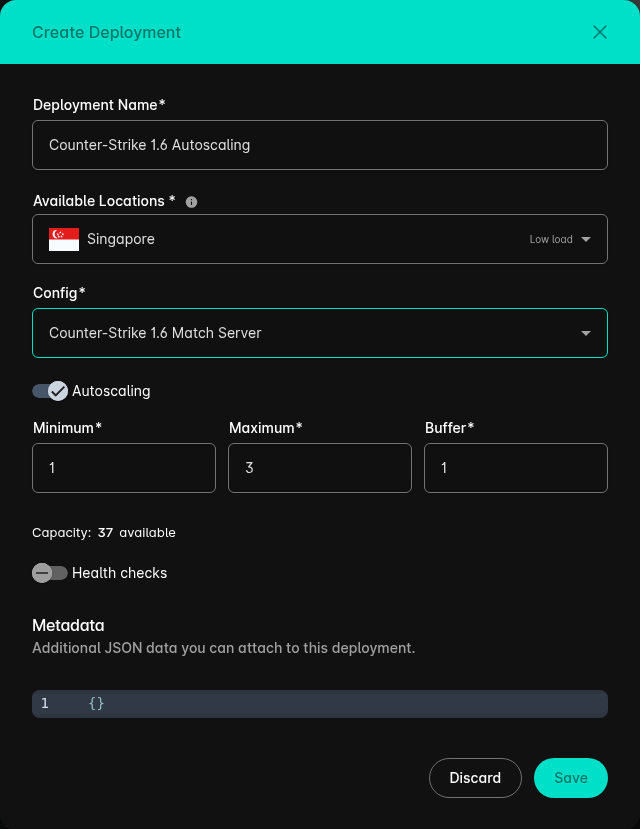
Minimum: The minimum number of server instances that should remain running.Maximum: The maximum number of server instances that may run at the same time.Buffer: The number of unallocated server instances that should remain ready to accept new game sessions. If this value is set to 0, the autoscaler does not maintain any spare instances. This means that it will not start another instance when all currently running instances are allocated, even if the configured maximum has not yet been reached.
For more information about the native autoscaler and its configuration options, refer to the ODIN Fleet Autoscaler guide.
Managed FlexMatch and GameLift remain responsible for session placement in this integration. GameLift selects an
available server process and invokes OnStartGameSession on that process. The selected server then reports its own
Fleet service as allocated, allowing the Fleet autoscaler to restore the configured buffer.
Do not also call Fleet's deployment-level allocation endpoint in this Managed FlexMatch flow. It selects a ready Fleet
service independently and could therefore reserve a different service than the process selected by GameLift.
To report the selected server's lifecycle states to ODIN Fleet, use the DockerServiceAutoscalingApi provided by the
ODIN Fleet API.
async function setServerStatus(serverID, status) {
  const dockerAutoscalingApi = new FleetApi.DockerServiceAutoscalingApi(config);

  switch (status) {
    case "ready":
      await dockerAutoscalingApi.dockerServicesAutoscalingReady({
        dockerService: serverID,
      });
      break;
    case "allocated":
      await dockerAutoscalingApi.dockerServicesAutoscalingAllocate({
        dockerService: serverID,
      });
      break;
    case "shutdown":
      await dockerAutoscalingApi.dockerServicesAutoscalingShutdown({
        dockerService: serverID,
      });
      break;
    default:
      throw new Error(`Unsupported autoscaling status: ${status}`);
  }
}
The game server must trigger these operations whenever its lifecycle state changes. It can call the ODIN Fleet API directly through HTTPS requests or report its state to an external backend service. This guide uses the backend-service approach.
Step 3: Add backend integration endpoints
To allow the game server to report its lifecycle state, create three HTTP endpoints in your backend service. Each endpoint forwards the corresponding state change to the ODIN Fleet API.
exports.SetServerActive = onRequest(
  { region: GCloudRegion },
  async (req, res) => {
    if (req.body.server_id === undefined) {
      return res.status(400).send("Missing server_id");
    }
    await ServerAPI.setServerStatus(req.body.server_id, "ready");
    return res.status(204).send();
  },
);

exports.SetServerUsed = onRequest(
  { region: GCloudRegion },
  async (req, res) => {
    if (req.body.server_id === undefined) {
      return res.status(400).send("Missing server_id");
    }
    await ServerAPI.setServerStatus(req.body.server_id, "allocated");
    return res.status(204).send();
  },
);

exports.SetServerShutdown = onRequest(
  { region: GCloudRegion },
  async (req, res) => {
    if (req.body.server_id === undefined) {
      return res.status(400).send("Missing server_id");
    }
    await ServerAPI.setServerStatus(req.body.server_id, "shutdown");
    return res.status(204).send();
  },
);
SetServerActive: Called when GameLift initialization is complete, marking the server as ready.SetServerUsed: Called when GameLift starts a game session on this process, reporting the selected instance as allocated.SetServerShutdown: Called when GameLift requests process termination. Fleet removes the instance and reconciles the autoscaled capacity.
Step 4: Unreal Engine game server updates
Finally, update the Unreal Engine dedicated server code to communicate these lifecycle states back to our backend.
void AOdinFleetGameMode::InitGameLift()
{
#if WITH_GAMELIFT
UE_LOG(GameServerLog, Log, TEXT("Game Lift initialized"));
FGameLiftServerSDKModule* GameLiftServerSdkModule = &FModuleManager::LoadModuleChecked<FGameLiftServerSDKModule>(FName("GameLiftServerSDK"));
Service_Id = FPlatformMisc::GetEnvironmentVariable(TEXT("SERVICE_ID"));
FServerParameters ServerParameters;
bool bIsAnywhereActive = false;
FGameLiftGenericOutcome InitSdkOutcome = GameLiftServerSdkModule->InitSDK();
if (InitSdkOutcome.IsSuccess())
{
UE_LOG(GameServerLog, SetColor, TEXT("%s"), COLOR_GREEN);
UE_LOG(GameServerLog, Log, TEXT("GameLift InitSDK succeeded!"));
UE_LOG(GameServerLog, SetColor, TEXT("%s"), COLOR_NONE);
}else
{
UE_LOG(GameServerLog, SetColor, TEXT("%s"), COLOR_RED);
UE_LOG(GameServerLog, Log, TEXT("ERROR: InitSDK failed : ("));
FGameLiftError GameLiftError = InitSdkOutcome.GetError();
UE_LOG(GameServerLog, Log, TEXT("ERROR: %s"), *GameLiftError.m_errorMessage);
UE_LOG(GameServerLog, SetColor, TEXT("%s"), COLOR_NONE);
return;
}
ProcessParameters = MakeShared<FProcessParameters>();
ProcessParameters->OnStartGameSession.BindLambda([=,this](Aws::GameLift::Server::Model::GameSession InGameSession)
{
FString GameSessionId = FString(InGameSession.GetGameSessionId());
UE_LOG(GameServerLog, Log, TEXT("GameSession Initializing: %s"), *GameSessionId);
GameLiftServerSdkModule->ActivateGameSession();
UGLBSServiceConnector::SetServerAsUsed(this->Service_Id);
});
ProcessParameters->OnUpdateGameSession.BindLambda([=](Aws::GameLift::Server::Model::UpdateGameSession InGameSession)
{
UE_LOG(GameServerLog, Log, TEXT("Game SessionUpdating"));
Aws::GameLift::Server::Model::UpdateReason c = InGameSession.GetUpdateReason();
Aws::GameLift::Server::Model::GameSession r = InGameSession.GetGameSession();
return;
});
ProcessParameters->OnTerminate.BindLambda([=,this]()
{
UE_LOG(GameServerLog, Log, TEXT("Game Server Process is terminating"));
FGameLiftGenericOutcome processEndingOutcome = GameLiftServerSdkModule->ProcessEnding();
FGameLiftGenericOutcome destroyOutcome = GameLiftServerSdkModule->Destroy();
if (processEndingOutcome.IsSuccess() && destroyOutcome.IsSuccess())
{
UE_LOG(GameServerLog, Log, TEXT("Server process ending successfully"));
UGLBSServiceConnector::ShutdownServer(this->Service_Id);
}else{
if (!processEndingOutcome.IsSuccess()) {
const FGameLiftError& error = processEndingOutcome.GetError();
UE_LOG(GameServerLog, Error, TEXT("ProcessEnding() failed. Error: %s"),
error.m_errorMessage.IsEmpty() ? TEXT("Unknown error") : *error.m_errorMessage);
}
if (!destroyOutcome.IsSuccess()) {
const FGameLiftError& error = destroyOutcome.GetError();
UE_LOG(GameServerLog, Error, TEXT("Destroy() failed. Error: %s"),
error.m_errorMessage.IsEmpty() ? TEXT("Unknown error") : *error.m_errorMessage);
}
}
});
ProcessParameters->OnHealthCheck.BindLambda([=]()
{
UE_LOG(GameServerLog, Log, TEXT("Performing Health Check"));
return true;
});
ProcessParameters->port = FURL::UrlConfig.DefaultPort;
TArray<FString> CommandLineTokens;
TArray<FString> CommandLineSwitches;
FCommandLine::Parse(FCommandLine::Get(),CommandLineTokens,CommandLineSwitches);
for (FString Switch : CommandLineSwitches)
{
FString Key;
FString Value;
if (Switch.Split("=",&Key,&Value))
{
UE_LOG(GameServerLog, Log, TEXT("KEY: %s"), *Key);
UE_LOG(GameServerLog, Log, TEXT("VALUE: %s"), *Value);
if (Key.Equals("extport"))
{
UE_LOG(GameServerLog, Log, TEXT("EXTPORT EXIST"));
ProcessParameters->port = FCString::Atoi(*Value);
}
}
}
if (UNetDriver* Driver = GetWorld()->GetNetDriver())
{
TSharedPtr<const FInternetAddr> LocalAddr = Driver->GetLocalAddr();
if (LocalAddr.IsValid())
{
UE_LOG(GameServerLog, Log, TEXT("PORT %i!"),LocalAddr->GetPort());
}
}
TArray<FString> LogFiles;
LogFiles.Add(TEXT("OdinFleet/Saved/Logs/server.log"));
ProcessParameters->logParameters = LogFiles;
UE_LOG(GameServerLog, Log, TEXT("Calling Process Ready..."));
FGameLiftGenericOutcome ProcessReadyOutcome = GameLiftServerSdkModule->ProcessReady(*ProcessParameters);
if (ProcessReadyOutcome.IsSuccess())
{
UE_LOG(GameServerLog, SetColor, TEXT("%s"), COLOR_GREEN);
UE_LOG(GameServerLog, Log, TEXT("Process Ready!"));
UE_LOG(GameServerLog, SetColor, TEXT("%s"), COLOR_NONE);
UGLBSServiceConnector::SetServerAsActive(Service_Id);
}
else
{
UE_LOG(GameServerLog, SetColor, TEXT("%s"), COLOR_RED);
UE_LOG(GameServerLog, Log, TEXT("ERROR: Process Ready Failed!"));
FGameLiftError ProcessReadyError = ProcessReadyOutcome.GetError();
UE_LOG(GameServerLog, Log, TEXT("ERROR: %s"), *ProcessReadyError.m_errorMessage);
UE_LOG(GameServerLog, SetColor, TEXT("%s"), COLOR_NONE);
}
UE_LOG(GameServerLog, Log, TEXT("InitGameLift completed!"));
#endif
}
GameLift invokes OnStartGameSession on the server process it selected for the session. SetServerAsUsed reports that
exact process, identified by its Fleet SERVICE_ID, as allocated. This synchronizes Fleet's capacity state without
running a second, independent allocation.
Implement your backend communication HTTPS requests in C++. Make sure the URIs map perfectly to the endpoints defined in Step 3.
void UGLBSServiceConnector::SetServerAsActive(FString ServerID)
{
	TSharedPtr<FJsonObject> JsonData = MakeShared<FJsonObject>();
	JsonData->SetStringField(TEXT("server_id"), ServerID);
	TSharedRef<IHttpRequest, ESPMode::ThreadSafe> Request = GetPostRequest("<your-backend-service-endpoint>/SetServerActive", JsonData);
	Request->ProcessRequest();
}

void UGLBSServiceConnector::SetServerAsUsed(FString ServerID)
{
	TSharedPtr<FJsonObject> JsonData = MakeShared<FJsonObject>();
	JsonData->SetStringField(TEXT("server_id"), ServerID);
	TSharedRef<IHttpRequest, ESPMode::ThreadSafe> Request = GetPostRequest("<your-backend-service-endpoint>/SetServerUsed", JsonData);
	Request->ProcessRequest();
}

void UGLBSServiceConnector::ShutdownServer(FString ServerID)
{
	TSharedPtr<FJsonObject> JsonData = MakeShared<FJsonObject>();
	JsonData->SetStringField(TEXT("server_id"), ServerID);
	TSharedRef<IHttpRequest, ESPMode::ThreadSafe> Request = GetPostRequest("<your-backend-service-endpoint>/SetServerShutdown", JsonData);
	Request->ProcessRequest();
}
Conclusion
With this integration, Managed FlexMatch and GameLift handle matchmaking and session placement, while the native ODIN
Fleet autoscaler maintains instance capacity from the server's lifecycle reports. Fleet autoscaling itself remains
independent of GameLift and can also be integrated with other matchmaking systems.
If you need a custom matchmaking solution, please contact us!