Autoscaling with ODIN Fleet, AWS GameLift and Unreal Engine
The goal of this guide is to explain how to manage the amount of deployed ODIN Fleet compute instances dynamically,
exemplary by using AWS FlexMatch and GameLift in combination with the ODIN Fleet API.
The automated scaling is based on the amount of players that want to play the game.
By doing this, you can utilize ODIN Fleet for on-demand dedicated game server scaling,
while continuing to rely on GameLift for matchmaking and session orchestration.
Requirements
- A dedicated Unreal Engine game server integrated with AWS GameLift Anywhere
- An Unreal Engine game client
- A backend service (e.g., Firebase Cloud Functions, Node.js, etc.)
- Access to ODIN Fleet and a configured App/Server configuration
If you need assistance with the basic setup, refer to the ODIN Fleet and AWS GameLift Anywhere integration guide and the ODIN Fleet and AWS GameLift FlexMatch integration guide.
Overview of the steps in this guide
- Configure the ODIN Fleet REST API in the backend
- Implement server instance scaling logic
- Build the Autoscaler with thresholds
- Implement the backend endpoints for GameLift integration
- Update your Unreal Engine game server code to handle session statuses
To deploy and manage ODIN Fleet servers dynamically, we use the ODIN Fleet REST API. You can generate an SDK in your preferred programming language using the OpenAPI specification. In this example, we use a TypeScript SDK generated from the OpenAPI spec to integrate it into our backend service.
First, specify your configuration parameters and authenticate by passing your access token in the header.
const FleetApi = require("odin-fleet-api");
const configID = <your-server-config-id>;
const appID = <your-fleet-appId>;
const OdinAccessToken = "<your-access-token>";
let defaultConfig = FleetApi.DefaultConfig;
var headers = {
Authorization: `Bearer ${OdinAccessToken}`,
};
var config = {
basePath: defaultConfig.basePath,
headers: { ...defaultConfig.headers, ...headers },
fetchApi: defaultConfig.fetchApi,
middleware: defaultConfig.middleware,
queryParamsStringify: defaultConfig.queryParamsStringify,
username: defaultConfig.username,
password: defaultConfig.password,
accessToken: OdinAccessToken,
credentials: defaultConfig.credentials,
apiKey: defaultConfig.apiKey,
};
This config is used to create several needed API classes.
Step 2: Implement server instance scaling logic
We need a few utility functions to start, create, and stop server instances based on demand.
Start an available server instance
The startAvailableServerInstanceForApp function starts an existing, but stopped, ODIN Fleet server instance. If no specific serverID is provided, we retrieve an available one.
async function startAvailableServerInstanceForApp(appID, serverID) {
let dockerapi = new FleetApi.DockerServiceApi(config);
let availableServerIds = [];
if (serverID === undefined) {
availableServerIds = await getAvailableServerIdsForApp(appID);
if (availableServerIds.length > 0) {
serverID = availableServerIds.readyForGameSession[0];
}
}
await setGameSessionStatusForServer(serverID, "Closed");
await dockerapi.startServer({ dockerService: serverID });
return serverID;
}
To easily track server availability, we use ODIN Fleet's metadata feature. Every time a game session is started or closed, we update the gamesSessionStatus metadata on the server instance.
async function setGameSessionStatusForServer(ServerID, Status) {
    const dockerApi = new FleetApi.DockerApi(config);
    await dockerApi.dockerServicesMetadataUpdate({
        dockerService: ServerID,
        patchMetadataRequest: { metadata: { gamesSessionStatus: Status } }
    });
}
Classify server statuses
To know how many servers are stopped, running, or already occupied, we use getAvailableServerIdsForApp:
async function getAvailableServerIdsForApp(appID) {
    let dockerapi = new FleetApi.DockerServiceApi(config);
    const servers = await dockerapi.getServers({ app: appID });

    let serverList = servers.data;
    let stoppedServersIds = [];
    let runningServerIds = [];
    let serverWithGameServer = [];

    for (let i = 0; i < serverList.length; i++) {
        const element = serverList[i];
        if (element.status == "stopped") {
            stoppedServersIds.push(element.id);
        } else if (element.metadata.gamesSessionStatus == "Available") {
            runningServerIds.push(element.id);
        } else if (element.metadata.gamesSessionStatus == "Started" || element.metadata.gamesSessionStatus == "Starting") {
            serverWithGameServer.push(element.id);
        }
    }

    return {
        stopped: stoppedServersIds,
        readyForGameSession: runningServerIds,
        withGameServer: serverWithGameServer,
        total: servers.data.length,
        totalRunning: runningServerIds.length + serverWithGameServer.length
    };
}
Create new server instances dynamically
If all existing instances are busy, we need to create new ones by increasing the maximum allowed instances in the ODIN Fleet location settings. The backend creates new instances and polls until they're ready.
async function createAndStartNewServerInstanceForApp(appId, locationSettingId, maxInstances) {
let locationApi = new FleetApi.AppLocationSettingApi(config);
let dockerApi = new FleetApi.DockerApi(config);
let servers = await dockerApi.getServers({ app: appId, filterAppLocationSettingId: locationSettingId });
let serverIDs = [];
let initialServerCount = servers.data.length;
let runningServers = 0;
for (let i = 0; i < servers.data.length; i++) {
const element = servers.data[i];
if (element.status == "running") {
runningServers++;
}
serverIDs.push(element.id);
}
if (runningServers >= maxInstances) {
return { newInstanceID: -1, runningServers: runningServers };
}
let locationSettings = await locationApi.getAppLocationSettingById({ appLocationSetting: locationSettingId });
if (locationSettings !== undefined) {
try {
await locationApi.updateAppLocationSetting({
appLocationSetting: locationSettingId,
updateAppLocationSettingRequest: { name: locationSettings.name, numInstances: locationSettings.numInstances + 1 }
});
} catch (e) {
console.log("Increasing instance count failed");
return { newInstanceID: -2, runningServers: runningServers };
}
servers = await dockerApi.getServers({ app: appId, filterAppLocationSettingId: locationSettingId });
let Timeout = false;
let deltaTime = 0;
while (servers.data.length == initialServerCount && !Timeout) {
console.log("Wait for Server");
await sleep(200);
deltaTime += 200;
servers = await dockerApi.getServers({ app: appId, filterAppLocationSettingId: locationSettingId });
if (deltaTime >= 2000) {
Timeout = true;
}
}
const newInstances = [];
for (let i = 0; i < servers.data.length; i++) {
console.log(servers.data[i]);
if (!serverIDs.includes(servers.data[i].id)) {
await setGameSessionStatusForServer(servers.data[i].id, "Closed");
newInstances.push(servers.data[i].id);
}
}
return { newInstanceID: newInstances, runningServers: servers.data.length };
}
}
Stopping server instances
When a game session is closed, we need to shut down the server instance to save resources.
async function stopServer(serverID) {
    let dockerapi = new FleetApi.DockerServiceApi(config);
    await dockerapi.stopServer({ dockerService: serverID });
}
Step 3: Build the Autoscaler with thresholds
Now we tie everything together into a scaling logic. You define simple rules like a threshold that decides when new servers should kickstart to reduce wait times for players. Every time a game session is requested, the autoscaler executes.
These values will be set as environment variables in the OS or the server config:
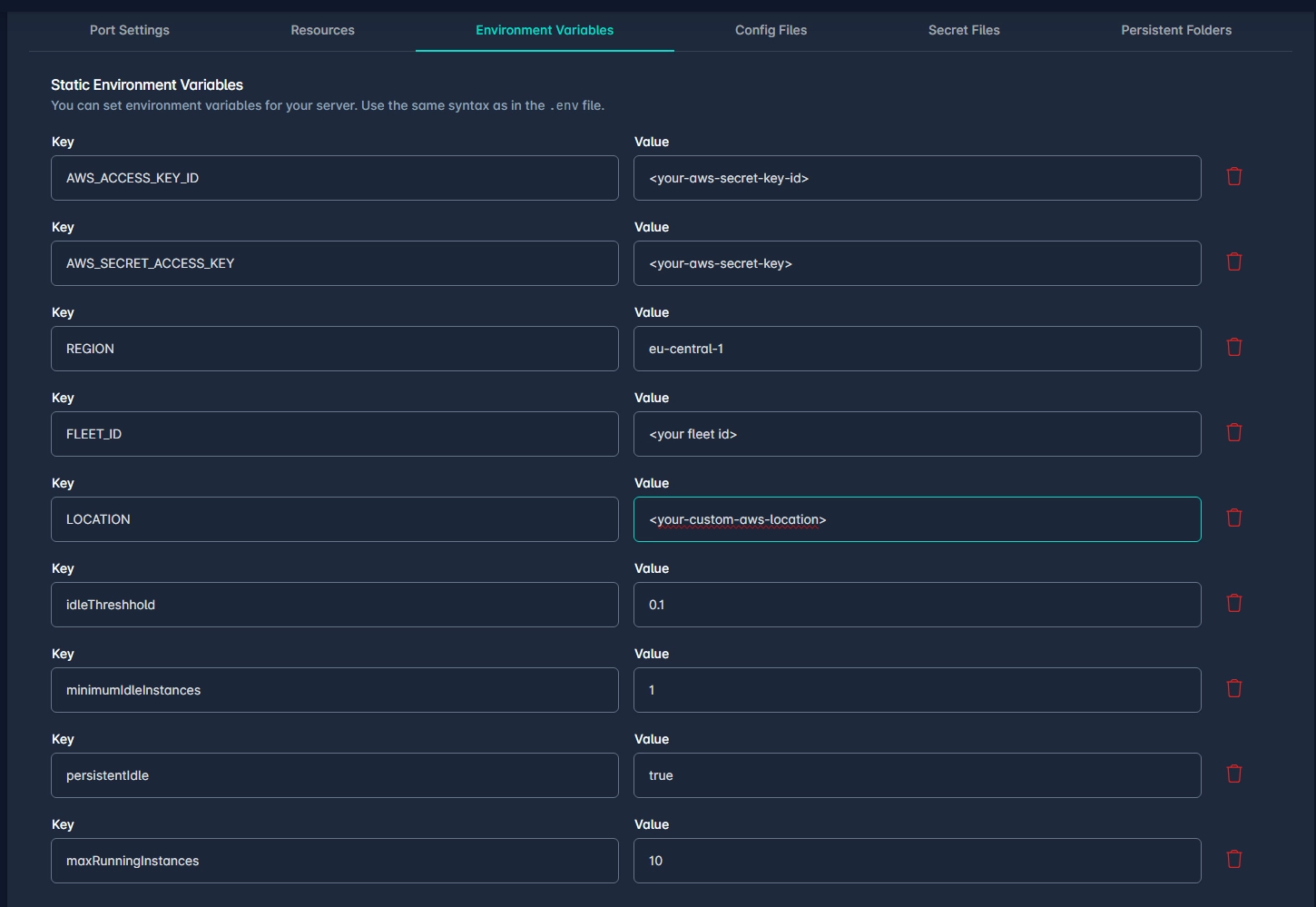
idleThreshhold: (Percentage) Amount of running but idle instances kept available for upcoming sessions.minimumIdleInstances: Absolute minimum of idle instances to always maintain.persistentIdle: A boolean to keep the minimum idle instances always active.maxRunningInstances: Hard limit on the maximum number of running instances to avoid endless scaling and effectively reduce costs.
async function startServerIfNeeded(appID, locationSettingId) {
let idleThreshhold = 0.0;
let minimumIdleInstances = 0;
let persistentIdle = false;
let maxRunningInstances = 10;
const configApi = new FleetApi.ServerConfigApi(config);
const serverConfig = await configApi.getServerConfigById({ serverConfig: configID });
for (let i = 0; i < serverConfig.env.length; i++) {
const element = serverConfig.env[i];
switch(element.key){
case "idleThreshhold":{
idleThreshhold = element.value;
}
case "minimumIdleInstances":{
minimumIdleInstances = element.value;
}
case "persistentIdle":{
persistentIdle = element.value;
}
case "maxRunningInstances":{
maxRunningInstances = element.value;
}
}
return createServerInstanceLock.runLocked(async () => {
let availableServerIds = await getAvailableServerIdsForApp(appID);
let minIdleInstancesNeeded = Math.floor(availableServerIds.withGameServer.length * idleThreshhold);
if (availableServerIds.totalRunning >= maxRunningInstances) {
return { created: 0, started: 0, available: availableServerIds.readyForGameSession.length };
}
if ((minIdleInstancesNeeded < minimumIdleInstances) && persistentIdle) {
minIdleInstancesNeeded = minimumIdleInstances;
}
minIdleInstancesNeeded++;
let newInstancesToCreate = 0;
let existingInstancesToStart = 0;
if (availableServerIds.readyForGameSession.length >= minIdleInstancesNeeded) {
return { created: 0, started: 0, available: availableServerIds.readyForGameSession.length };
}
if (availableServerIds.stopped.length >= minIdleInstancesNeeded) {
existingInstancesToStart = minIdleInstancesNeeded;
} else {
existingInstancesToStart = availableServerIds.stopped.length;
newInstancesToCreate = Math.max(minIdleInstancesNeeded - existingInstancesToStart - availableServerIds.readyForGameSession.length, 0);
}
const startedServerInstancePromises = [];
for(let i = 0; i < existingInstancesToStart;i++){
startedServerInstancePromises.push(await startAvailableServerInstanceForApp(appID, availableServerIds.stopped[i]));
}
const startedServerInstaceIds = await Promise.all(startedServerInstancePromises);
const createServerInstancesPromises = [];
for(let i = 0; i< newInstancesToCreate; i++){
createServerInstancesPromises.push(await createAndStartNewServerInstanceForApp(appID,locationSettingId,maxRunningInstances));
}
const createdServerInstanceIds = await Promise.all(createServerInstancesPromises);
return { created: createdServerInstanceIds, started: startedServerInstaceIds, available: availableServerIds.readyForGameSession.length };
});
}
This ensures we respect environment variables while starting or deploying server containers.
The createServerInstanceLock is an AsyncLock/Mutex which guarantees synchronous container initialization, preventing race conditions entirely. Note: If the backend scales horizontally (e.g., across multiple serverless cloud function containers), you should back this locked state atomic operation with an external store (like Redis, Firestore or similar) instead of this in-memory implementation loop to avoid container concurrency failures.
class AsyncLock {
constructor() {
this._locked = false;
this._waiters = [];
}
async aquire() {
if (!this._locked) {
this._locked = true;
return this._release.bind(this);
}
return new Promise(resolve => this._waiters.push(resolve)).then(() => this._release.bind(this));
}
_release() {
const next = this._waiters.shift();
if (next) next();
else this._locked = false;
}
async runLocked(func){
const release = await this.aquire();
try{
return await func();
}finally{
release();
}
}
}
const createServerInstanceLock = new AsyncLock();
Step 4: Backend integration endpoints
Integrate the autoscaler straight into your GameLift start matchmaking calls.
Every time a gamesession is requested, the autoscaler is fired to provision space.
exports.GameLiftQueueGameSession = onRequest({region:GCloudRegion},async (req,res) =>{
    if(req.body.SessionName === undefined){
        res.status(401).send("Missing SessionName");
        return;
    }
    if(req.body.PlacementId === undefined){
        res.status(401).send("Missing PlacementId");
        return;
    }
    const input = {
        PlacementId:req.body.PlacementId,
        GameSessionQueueName: "<your-placement-queue>",
        MaximumPlayerSessionCount: Number(2),
        GameSessionName:req.body.SessionName
    };
    let serverID = await ServerAPI.startServerIfNeeded(appID,locationSettingsId);

    if(serverID.available == 0){
        if(serverID.serverCreated == false && serverID.started.length == 0){
            res.status(500).send("maximum-running-instances");
            return;
        }
        await tryUntil(result => result == true,async (s)=>{
            let availableServerIds = await ServerAPI.getAvailableServerIdsForApp(ServerAPI.appID,false);
            if(availableServerIds.readyForGameSession.length >= 1){
                return true;
            }
            return false;
        },5000,120000,serverID);
    }
    const command = new StartGameSessionPlacementCommand(input);

    const dbEntry = {
        placementId: input.PlacementId,
        type: "PlacementStarted",
        Name:input.GameSessionName,
        startTime:Timestamp.now(),
        Time:Timestamp.now(),
    }
    await db.collection('GameSessions').doc(input.PlacementId).create(dbEntry);

    let result = await executeCommand(res,command,false);
    console.log(result);
    res.status(200).send(result);
    return;
});
We also implement specific lifecycle trigger API routes for our game servers to hit to update their current utilization.
exports.SetServerActive = onRequest({region: GCloudRegion}, async (req, res) => {
    if (req.body.server_id === undefined) {
        res.status(401).send("Missing ServerID");
        return;
    }
    await ServerAPI.setGameSessionStatusForServer(req.body.server_id, "Available");
});

exports.SetServerUsed = onRequest({region: GCloudRegion}, async (req, res) => {
    if (req.body.server_id === undefined) {
        res.status(401).send("Missing ServerID");
        return;
    }
    await ServerAPI.setGameSessionStatusForServer(req.body.server_id,"Started");
});

exports.SetServerShutdown = onRequest({region: GCloudRegion}, async (req, res) => {
    if (req.body.server_id === undefined) {
        res.status(401).send("Missing ServerID");
        return;
    }
    await ServerAPI.setGameSessionStatusForServer(req.body.server_id, "Closed");
    await ServerAPI.stopServer(req.body.server_id);
});
SetServerActive: Called when GameLift initialization is complete, marking the server as ready.SetServerUsed: Called when a game session has officially started, occupying the instance.SetServerShutdown: Called when a game session terminates, to enforce a shutdown and guarantee saving costs.
Step 5: Unreal Engine game server updates
Finally, update the Unreal Engine dedicated server code to communicate these life-cycle states back to our backend.
void AOdinFleetGameMode::InitGameLift()
{
#if WITH_GAMELIFT
	UE_LOG(GameServerLog, Log, TEXT("Game Lift initialized"));
	FGameLiftServerSDKModule* GameLiftServerSdkModule = &FModuleManager::LoadModuleChecked<FGameLiftServerSDKModule>(FName("GameLiftServerSDK"));
	Service_Id = FPlatformMisc::GetEnvironmentVariable(TEXT("SERVICE_ID"));

	FServerParameters ServerParameters;
	bool bIsAnywhereActive = false;

	FGameLiftGenericOutcome InitSdkOutcome = GameLiftServerSdkModule->InitSDK();
	if (InitSdkOutcome.IsSuccess())
	{
		UE_LOG(GameServerLog, SetColor, TEXT("%s"), COLOR_GREEN);
		UE_LOG(GameServerLog, Log, TEXT("GameLift InitSDK succeeded!"));
		UE_LOG(GameServerLog, SetColor, TEXT("%s"), COLOR_NONE);
	}else
	{
		UE_LOG(GameServerLog, SetColor, TEXT("%s"), COLOR_RED);
		UE_LOG(GameServerLog, Log, TEXT("ERROR: InitSDK failed : ("));
		FGameLiftError GameLiftError = InitSdkOutcome.GetError();
		UE_LOG(GameServerLog, Log, TEXT("ERROR: %s"), *GameLiftError.m_errorMessage);
		UE_LOG(GameServerLog, SetColor, TEXT("%s"), COLOR_NONE);
		return;
	}
	ProcessParameters = MakeShared<FProcessParameters>();

	ProcessParameters->OnStartGameSession.BindLambda([=,this](Aws::GameLift::Server::Model::GameSession InGameSession)
	{

		FString GameSessionId = FString(InGameSession.GetGameSessionId());
		UE_LOG(GameServerLog, Log, TEXT("GameSession Initializing: %s"), *GameSessionId);
		GameLiftServerSdkModule->ActivateGameSession();
		UGLBSServiceConnector::SetServerAsUsed(this->Service_Id); //on gamesession creation, set the status of the server
	});
	ProcessParameters->OnUpdateGameSession.BindLambda([=](Aws::GameLift::Server::Model::UpdateGameSession InGameSession)
	{
		UE_LOG(GameServerLog, Log, TEXT("Game SessionUpdating"));
		Aws::GameLift::Server::Model::UpdateReason c = InGameSession.GetUpdateReason();
		Aws::GameLift::Server::Model::GameSession r = InGameSession.GetGameSession();
		return;
	});
	ProcessParameters->OnTerminate.BindLambda([=,this]()
	{
		UE_LOG(GameServerLog, Log, TEXT("Game Server Process is terminating"));
		FGameLiftGenericOutcome processEndingOutcome = GameLiftServerSdkModule->ProcessEnding();

		FGameLiftGenericOutcome destroyOutcome = GameLiftServerSdkModule->Destroy();
		if (processEndingOutcome.IsSuccess() && destroyOutcome.IsSuccess())
		{
			UE_LOG(GameServerLog, Log, TEXT("Server process ending successfully"));
			UGLBSServiceConnector::ShutdownServer(this->Service_Id); //shutdown the server
			//FGenericPlatformMisc::RequestExit(false);
		}else{
			if (!processEndingOutcome.IsSuccess()) {
				const FGameLiftError& error = processEndingOutcome.GetError();
				UE_LOG(GameServerLog, Error, TEXT("ProcessEnding() failed. Error: %s"),
				error.m_errorMessage.IsEmpty() ? TEXT("Unknown error") : *error.m_errorMessage);
			}
			if (!destroyOutcome.IsSuccess()) {
				const FGameLiftError& error = destroyOutcome.GetError();
				UE_LOG(GameServerLog, Error, TEXT("Destroy() failed. Error: %s"),
				error.m_errorMessage.IsEmpty() ? TEXT("Unknown error") : *error.m_errorMessage);
			}
		}
	});


	ProcessParameters->OnHealthCheck.BindLambda([=]()
	{
		UE_LOG(GameServerLog, Log, TEXT("Performing Health Check"));
		return true;
	});


	ProcessParameters->port = FURL::UrlConfig.DefaultPort;


	TArray<FString> CommandLineTokens;
	TArray<FString> CommandLineSwitches;

	FCommandLine::Parse(FCommandLine::Get(),CommandLineTokens,CommandLineSwitches);

	for (FString Switch : CommandLineSwitches)
	{
		FString Key;
		FString Value;

		if (Switch.Split("=",&Key,&Value))
		{
		    UE_LOG(GameServerLog, Log, TEXT("KEY: %s"), *Key);
		    UE_LOG(GameServerLog, Log, TEXT("VALUE: %s"), *Value);
			if (Key.Equals("extport"))
			{
				UE_LOG(GameServerLog, Log, TEXT("EXTPORT EXIST"));
				ProcessParameters->port = FCString::Atoi(*Value);
			}
		}
	}
	if (UNetDriver* Driver = GetWorld()->GetNetDriver())
	{
		TSharedPtr<const FInternetAddr> LocalAddr = Driver->GetLocalAddr();

		if (LocalAddr.IsValid())
		{
			UE_LOG(GameServerLog, Log, TEXT("PORT %i!"),LocalAddr->GetPort());
		}
	}

	TArray<FString> LogFiles;
	LogFiles.Add(TEXT("OdinFleet/Saved/Logs/server.log"));
	ProcessParameters->logParameters = LogFiles;

	UE_LOG(GameServerLog, Log, TEXT("Calling Process Ready..."));

	FGameLiftGenericOutcome ProcessReadyOutcome = GameLiftServerSdkModule->ProcessReady(*ProcessParameters);

	if (ProcessReadyOutcome.IsSuccess())
	{
		UE_LOG(GameServerLog, SetColor, TEXT("%s"), COLOR_GREEN);
		UE_LOG(GameServerLog, Log, TEXT("Process Ready!"));
		UE_LOG(GameServerLog, SetColor, TEXT("%s"), COLOR_NONE);
		UGLBSServiceConnector::SetServerAsActive(Service_Id); //Set the server as available for gamesessions
	}
	else
	{
		UE_LOG(GameServerLog, SetColor, TEXT("%s"), COLOR_RED);
		UE_LOG(GameServerLog, Log, TEXT("ERROR: Process Ready Failed!"));
		FGameLiftError ProcessReadyError = ProcessReadyOutcome.GetError();
		UE_LOG(GameServerLog, Log, TEXT("ERROR: %s"), *ProcessReadyError.m_errorMessage);
		UE_LOG(GameServerLog, SetColor, TEXT("%s"), COLOR_NONE);
	}
	UE_LOG(GameServerLog, Log, TEXT("InitGameLift completed!"));
	#endif
}
Implement your backend communication HTTP calls in C++. Make sure the URIs map perfectly to the endpoints defined in Step 4.
void UGLBSServiceConnector::SetServerAsActive(FString ServerID)
{
	TSharedPtr<FJsonObject> JsonData = MakeShared<FJsonObject>();
	JsonData->SetStringField(TEXT("server_id"), ServerID);
	TSharedRef<IHttpRequest, ESPMode::ThreadSafe> Request = GetPostRequest("<your-backend-service-endpoint>/SetServerActive", JsonData);
	Request->ProcessRequest();
}

void UGLBSServiceConnector::SetServerAsUsed(FString ServerID)
{
	TSharedPtr<FJsonObject> JsonData = MakeShared<FJsonObject>();
	JsonData->SetStringField(TEXT("server_id"), ServerID);
	TSharedRef<IHttpRequest, ESPMode::ThreadSafe> Request = GetPostRequest("<your-backend-service-endpoint>/SetServerUsed", JsonData);
	Request->ProcessRequest();
}

void UGLBSServiceConnector::ShutdownServer(FString ServerID)
{
	TSharedPtr<FJsonObject> JsonData = MakeShared<FJsonObject>();
	JsonData->SetStringField(TEXT("server_id"), ServerID);
	TSharedRef<IHttpRequest, ESPMode::ThreadSafe> Request = GetPostRequest("<your-backend-service-endpoint>/SetServerShutdown", JsonData);
	Request->ProcessRequest();
}
Conclusion
With everything implemented, the autoscaler is complete. Even though it is heavily integrated into the GameLift lifecycle in this example, the auto-scaling mechanism works completely independently of GameLift. If you are using FlexMatch or other custom matchmaking solutions, your backend server simply invokes startServerIfNeeded ahead of initializing game session placements.
We will build further on our given solutions and offer updated guides, e.g. when ODIN Fleet supports custom domains with dynamic DNS and also when it will offer native scaling options.
If you need custom solutions for your own matchmakign solution, please contact us!