Migrating from ODIN SDK v1 to v2
The ODIN SDK Version 2 introduces significant architectural improvements to provide more control over audio pipelines, better performance, and enhanced flexibility. This guide details the necessary steps to upgrade your project.
1. Architectural Changes
Connection Pooling
ODIN v2.x now uses Connection Pooling under the hood. Multiple rooms automatically share the same underlying network connection to the ODIN gateway. This reduces overhead and simplifies network management.
Removal of Media Objects
In v1, Media objects (instances of UOdinCaptureMedia or UOdinPlaybackMedia) wrapped audio streams. In v2, these have been replaced by Encoders and Decoders.
- Encoders handle outgoing audio from a local source like a microphone.
- Decoders handle incoming audio received from remote peers.
Unlike earlier versions, the SDK will not automatically create media objects anymore. Instead, applications are expected to create encoders and decoders as needed, e.g. one encoder for the local peer and one decoder for each remote peer.
Audio Pipelines and Effects
Each encoder and decoder in ODIN now exposes an internal audio pipeline. This is an extensible processing chain in which audio effects are applied sequentially to all audio going through the encoder or decoder.
The APM effects of v1.x are now inserted as part of this audio pipeline and are split into a VAD (Voice Activity Detection) and APM efffects module.
Additionally, it is now possible to define custom effects to insert your own audio processing functions.
Effects can be removed or reordered dynamically as needed.
Audio Events
ODIN now provides the On Audio Event Callback for both encoders and decoders. This replaces the Media Activity State Changed event, which was previously emitted from the Odin room objects.
In addition to the reporting the talk status of peers, the On Audio Event Callback can be emitted for position changes.
Proximity and Channel masks
ODIN v2.x now provides a powerfull channel mask system, to determine which peers and channels to receive audio from. Each peer maintains a global/server mask and a set of per-peer masks. When deciding whether to forward audio from a given peer and channel, the server takes the bitwise AND of the global mask and the specific peer's mask. By default, both are set to FULL, meaning you will receive all audio from all peers.
Each room support up to sixty-four audio channels, represented by a 64-bit channel mask. Peers can transmit on one or more channels at the same time and each receiver decides exactly which peers and channels to hear by adjusting its masks. Every channel can also carry its own 3D position, which the server uses to perform automatic distance culling within a unit sphere radius of 1.0. By scaling your world coordinates into this unit sphere before sending, you can implement scalable, spatially-aware voice systems without manually filtering streams on the client.
By default, new ODIN encoders only push audio on channel 1 and are positioned at the origin.
2. Migration Checklist
- Back up your project.
- Remove the old
Odinplugin folder. - Install the new v2 Plugin using any of the provided methods in our installation guide.
- Remove the
Binaries,DerivedDataCacheandIntermediatefolders from your project, then regenerate your Visual Studio project files. - Walk through the Step-By-Step Replacement section to update your code and fix any issues.
3. Step by step replacement
These steps will take you through all the important changes that you will need to make.
3.1 Token generation
In v2.x you will need to provide json-encoded authentication data during the join-room process.
- Blueprint Setup
- C++ Setup
Token generation in v1.x:
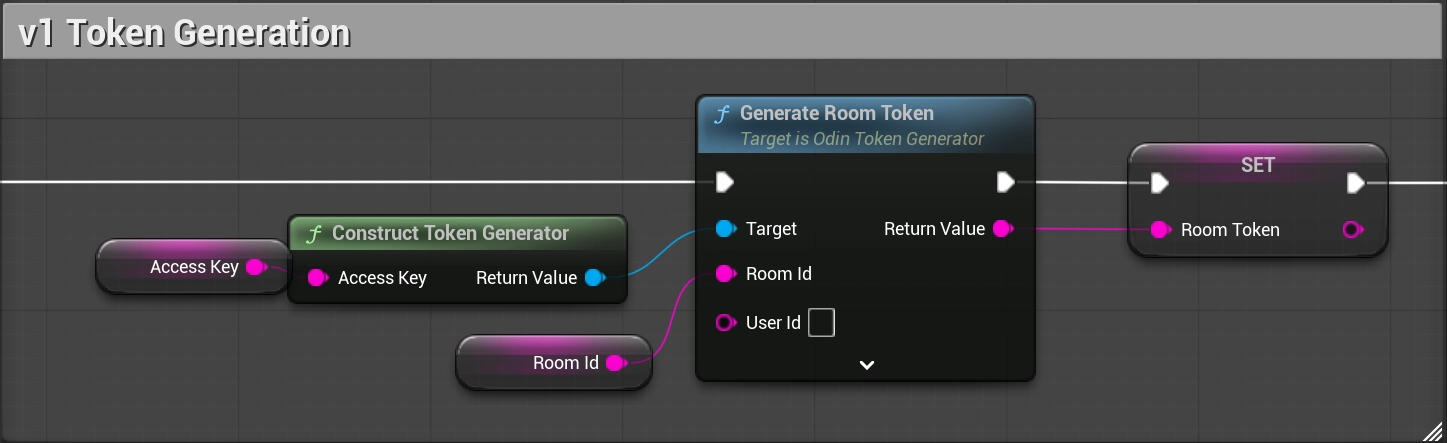
Token generation in v2.x:

Token generation in v1.x:
Token generation in v2.x:
Be aware that access keys serve as your unique authentication keys, required for generating room tokens to access ODIN servers. To ensure your security, it's strongly recommended that you NEVER use an access key in your client-side code and instead generate room tokens on a server.
3.2 Listening to room events
In v2.x the available room events have been changed:
| Event | Changes in v2.x |
|---|---|
On Media Active State Changed | Replaced by the Is Silent Changed type of On Audio Event events. |
On Media Added | Removed. Audio will now be retrieved by creating a decoder during On Peer Joined events. |
On Media Removed | Removed. |
On Message Received | Renamed to On Room Message Received. Parameters are now packed into the FOdinMessageReceived struct. |
On Peer Joined | Renamed to On Room Peer Joined. Parameters are now packed into the FOdinPeerJoined struct. |
On Peer Left | Renamed to On Room Peer Left. Parameters are now packed into the FOdinPeerLeft struct |
On Peer User Data Changed | Renamed to On Room Peer Changed. Parameters are now packed into the FOdinPeerChanged struct. |
On Room Connection State Changed | Renamed to On Room Status Changed. Parameters are now packed into the FOdinRoomStatusChanged struct. |
On Room Joined | Parameters are now packed into the FOdinJoined struct. |
On Room User Data Changed | Removed. Instead, use the new On Rpc event to receive json-encoded messages sent in the room. |
On Connection State Changed | Removed, use the On Room Status Changed event instead to retrieve room state updates. |
New events:
| Event | Description |
|---|---|
On Room New Reconnect Token | Will be called when a new reconnect token is available. |
On Rpc | Will be called for all control and event messages. |
3.3 Room construction
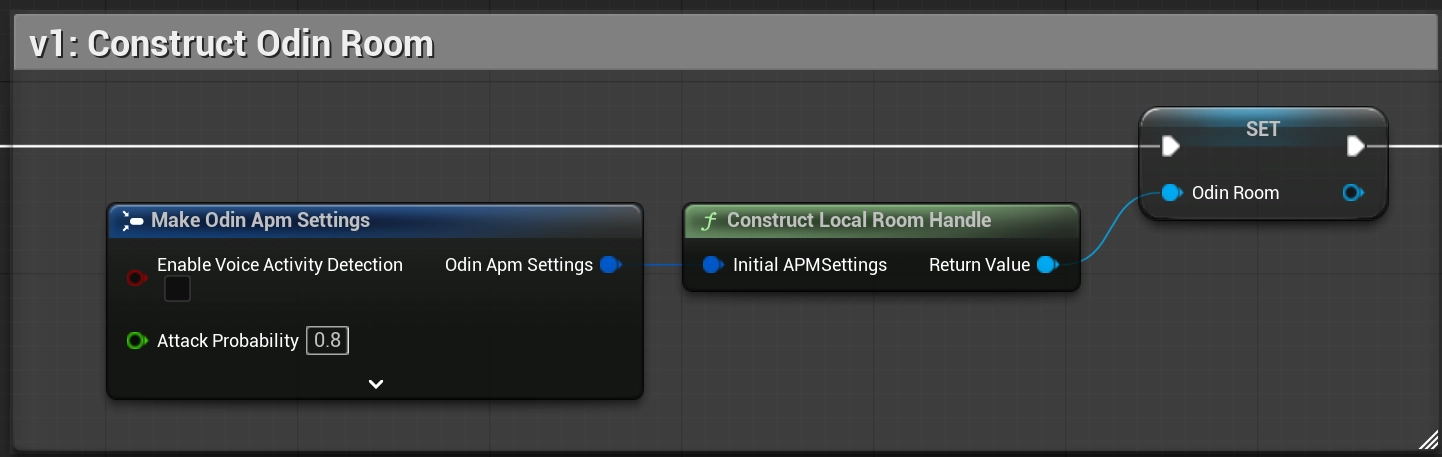
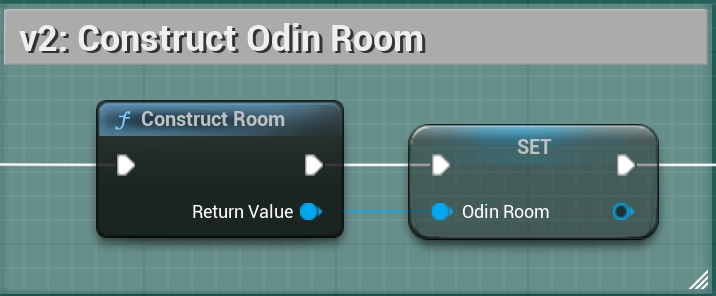
During room construction it is now no longer possible to provide APM settings. APM and VAD is now configured later on in the effect pipeline of the encoder.
- Blueprint Setup
- C++ Setup
Constructing a room in v1.x:
Constructing a room in v2.x:
Room Construction in v1.x:
Room Construction in v2.x:
3.4 Joining a room
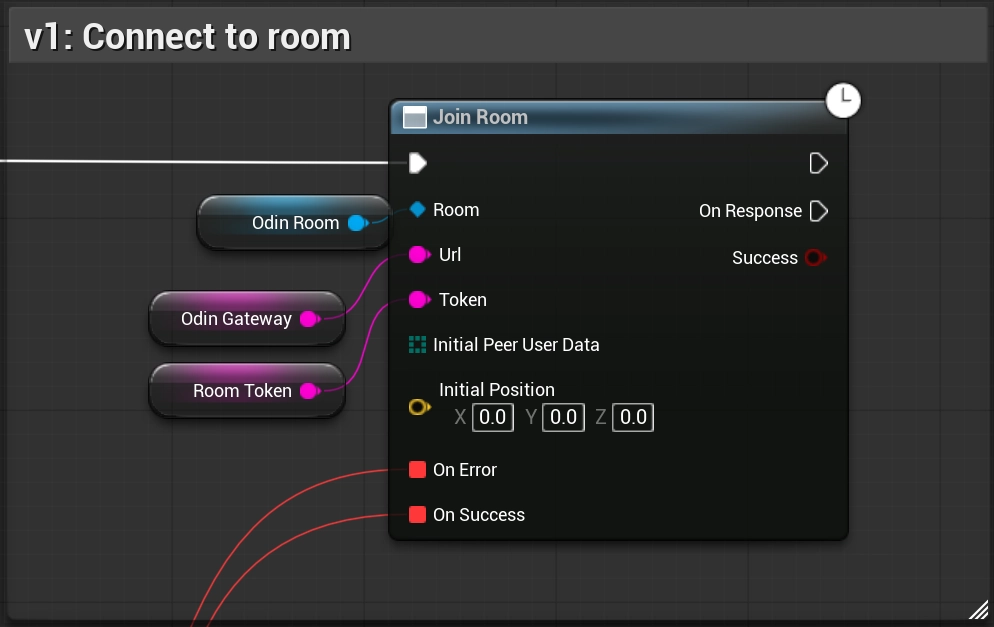
The latent Join Room function was replaced by the Connect Room function. Instead of waiting for the On Error and On Success callbacks, you can now use the On Room Joined or the result of Success.
- Blueprint Setup
- C++ Setup
Joining a room in v1.x:
Joining a room in v2.x:
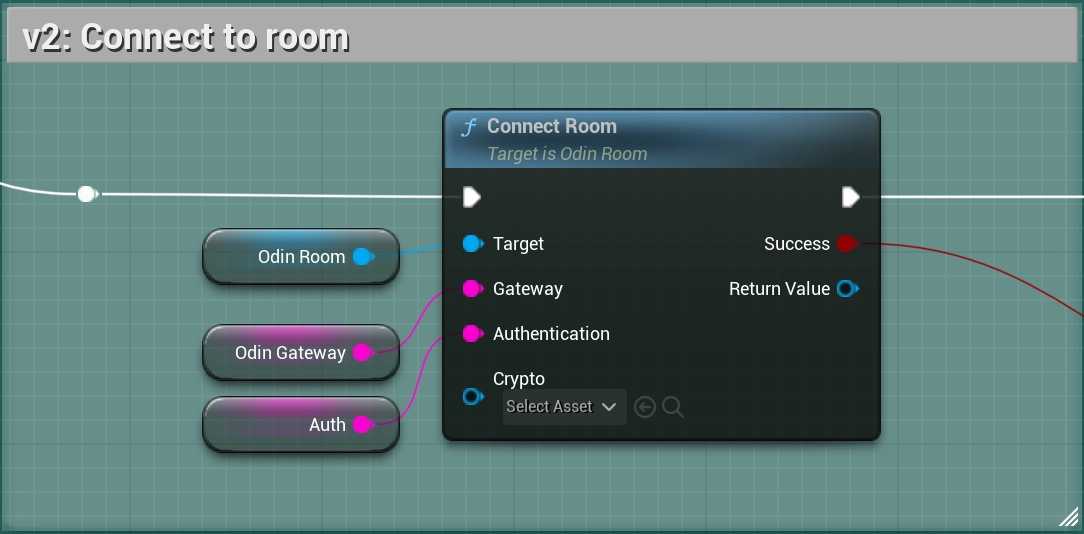
Joining a room in v1.x:
Joining a room in v2.x:
3.5 Setup microphone input
Creating the UAudioCapture or UOdinAudioCapture object hasn't changed from v1.x. to v2.x. But instead of creating a capture media stream, we now call Create Odin Encoder from Generator (UOdinFunctionLibrary::CreateOdinEncoderFromGenerator) to setup an UOdinEncoder, which is used by the Odin plugin to encode and push audio to the server.
It's a good idea to hold a reference to the created encoder object, to be able to apply APM, VAD or custom voice effects, to receive Is Silent Changed Audio events and to keep the object from being cleaned up by the garbage collector.
- Blueprint Setup
- C++ Setup
Setting up microphone input in v1.x:
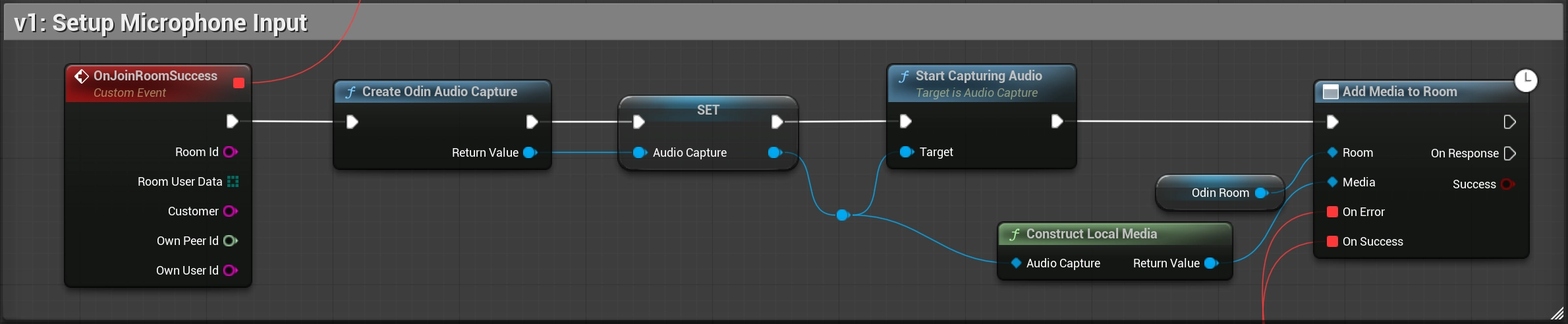
Setting up microphone input in v2.x:
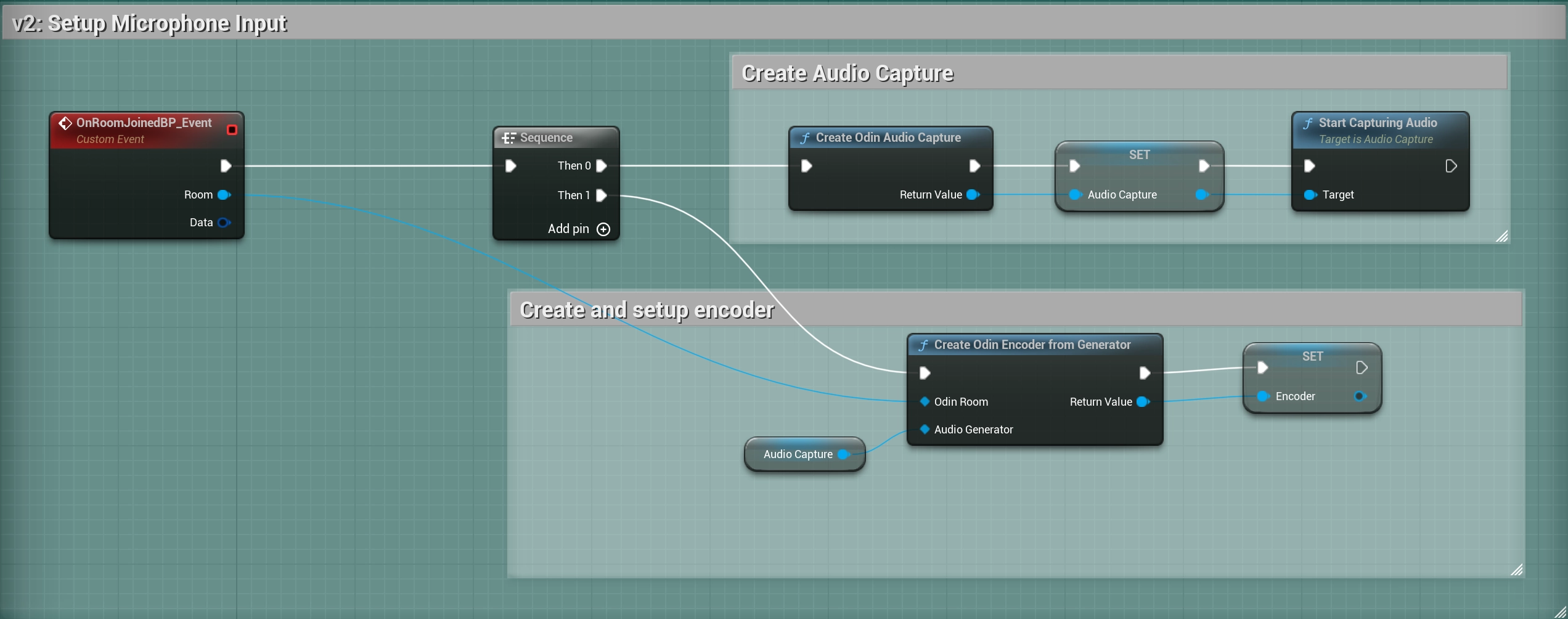
Setting up microphone input in v1.x:
Setting up microphone input in v2.x:
Don't forget to keep the reference to the created UOdinEncoder object alive, otherwise it will be automatically cleaned up by the garbage collector. Do this by storing a pointer to the object as an instance variable (marked as UPROPERTY() in C++).
3.6 Audio Playback
In v1.x the approach to setup audio playback was to listen to the On Media Added room event and assign the provided UOdinPlaybackMedia to a UOdinSynthComponent.
Instead, we have the following approach:
- Create an
UOdinDecoderobject usingConstruct Decoder(UOdinDecoder::ConstructDecoder) - Link the decoder to the newly joined peer by calling
Register Decoder to Peer(UOdinFunctionLibrary::RegisterDecoder) - Use the created decoder as input to the
Add Odin Synth Componentconstructor, or by callingSet Decoder(UOdinSynthComponent::SetDecoder).
The Odin Synth Component will then automatically use the decoder to request audio from the server for the registered peer and playback the Voice Chat audio.
- Blueprint Setup
- C++ Setup
Setting up audio playback in v1.x:
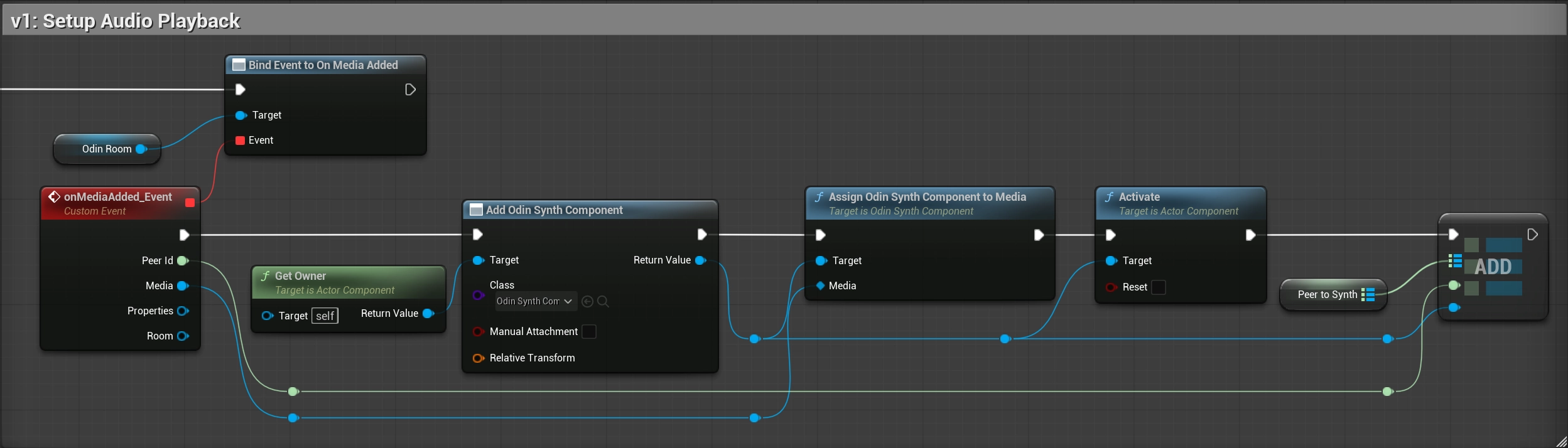
Setting up audio playback in v2.x:
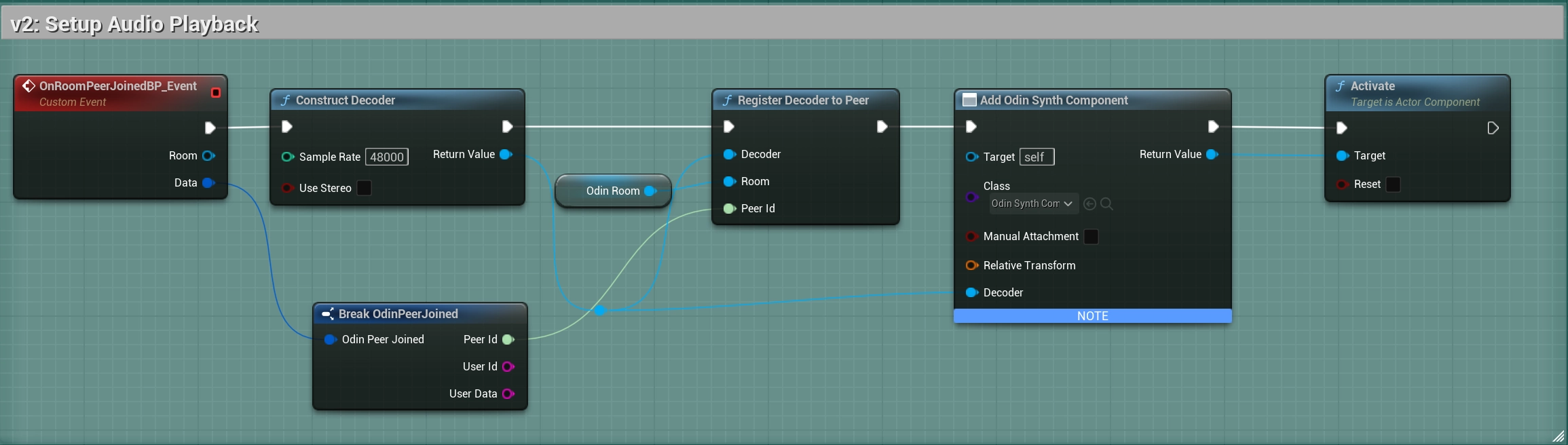
Before (V1):
After (V2):
3.7 Audio Pipeline (VAD, APM, Filters)
In V2, you wrap your Audio Capture in an Encoder. The Encoder exposes an Audio Pipeline, which is a chain of effects (VAD, Filters, APM).
Using the UOdinPipeline object, you can insert VAD, APM and Custom effects in any order:
- Blueprint Setup
- C++ Setup
Setting up APMs in v2.x:
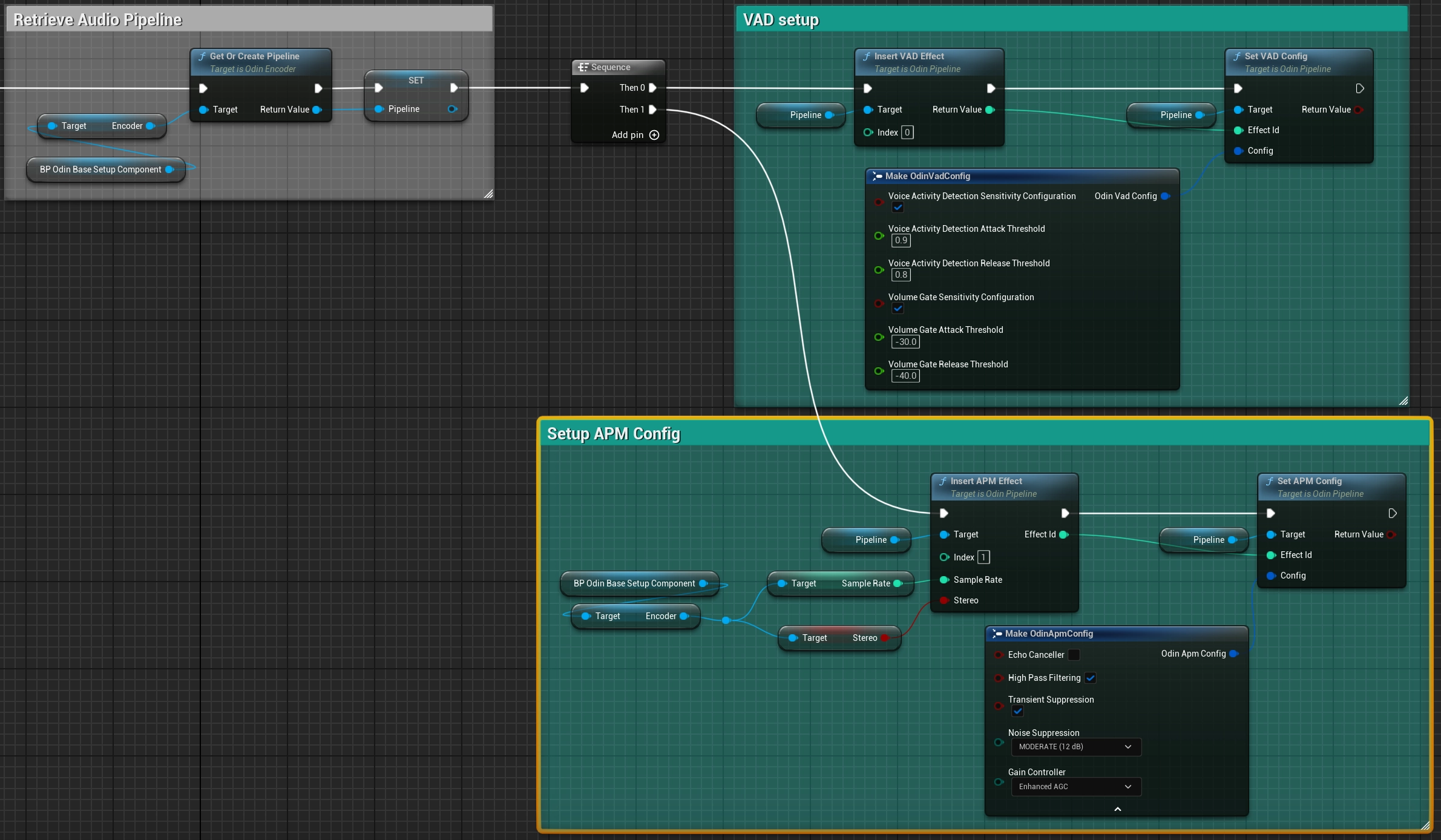
Setting up APMs in v2.x:
New Features in V2
Proximity & Channel Masks
V2 supports up to 64 audio channels per room.
- Channel Masks: You can filter which peers you hear by setting channel masks (e.g., Team A only hears Team A).
- Positions: Encoders can send 3D positions per channel. The server uses these for distance culling within a unit sphere (Radius = 1.0).
- Background Updates: Silent encoders can now send periodic position updates even when not transmitting audio, keeping spatial systems in sync.
End-to-End Encryption
V2 introduces a pluggable OdinCipher module. You can secure a room with a shared password/secret. This encrypts all voice data and messages client-side, ensuring the server cannot inspect the content.